

My coffee shop owner friend Maria called me last spring in a mild panic. Her part-time social media person had just quit, and she had no idea how she’d keep posting daily content while also running the actual shop.
I told her about a few AI tools I’d been using in my own consulting work. Within a week she had a content calendar running again, mostly by herself, with maybe an extra thirty minutes added to her day instead of the three hours her old employee used to spend.
That conversation stuck with me because it’s basically the same story I hear from small business owners constantly. Too much to do, not enough hands, and a nagging feeling that AI tools are either too complicated or too good to be true.
Having actually tested a long list of these tools across my own work and a handful of client businesses, here’s an honest breakdown of what genuinely helps, what’s overrated, and how to actually put these tools to work without wasting a weekend figuring out settings.
The Real Problem AI Tools Solve for Small Businesses
Small business owners rarely lack ideas. What they lack is time and extra hands to execute everything at once.
Most AI tools worth using don’t generate brilliant strategy out of nowhere. They handle the repetitive, time-consuming pieces so your actual energy goes toward decisions that genuinely require a human brain.
Once I stopped expecting AI to think for me and started using it purely for execution, everything clicked into place much faster.
1. ChatGPT for Everyday Writing Tasks

Emails, product descriptions, FAQ pages, social captions, ChatGPT handles the first draft of nearly all of it in my business now.
My biggest early mistake was copying output directly without editing. A customer once pointed out that an email “sounded weirdly formal,” and honestly, they were right.
Getting better results
- Describe your business tone clearly, casual, professional, playful, whatever fits.
- Give specific context about the situation or audience.
- Ask for a draft, then rewrite sections in your own natural voice.
- Save prompts that consistently work well for reuse later.
Treating it like a fast intern rather than a finished writer changed my results completely.
2. Canva’s AI Design Tools for Non-Designers
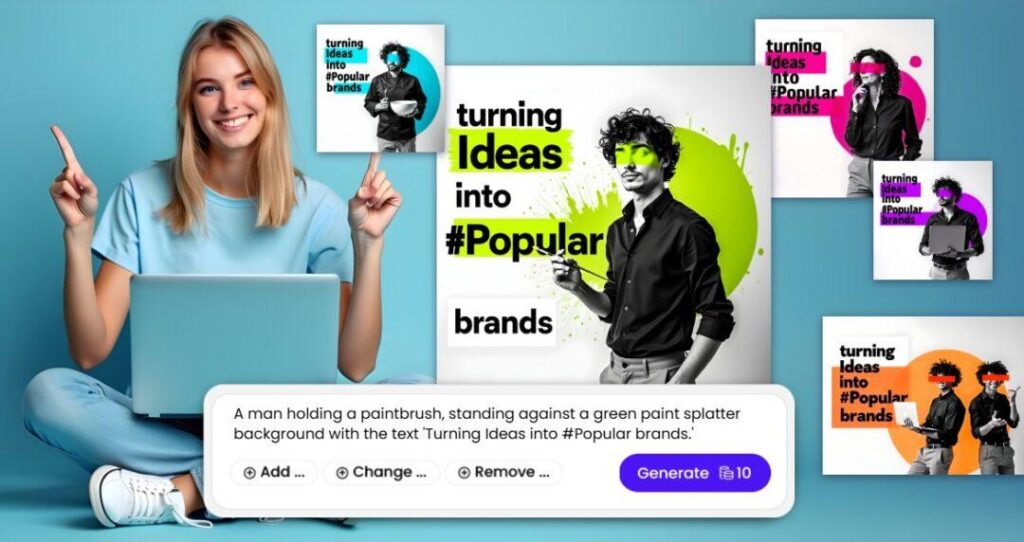
Design felt genuinely intimidating before Canva’s AI features existed. Simple graphics used to take me nearly an hour of frustrated clicking around.
Magic Design and the background remover tool cut that time down dramatically. Product mockups, flyers, and social graphics now take minutes instead of an entire afternoon.
Quick workflow
Type a description of what you need into Canva’s Magic Design search bar. Pick a template from the results, swap in your own photos and colors, and export.
3. Grammarly for Professional Communication

A typo in a client proposal cost me some credibility once, an embarrassing mistake sitting right in the opening paragraph that I somehow missed three separate read-throughs.
Grammarly runs quietly in the background now across emails, documents, and website drafts, catching errors before they go anywhere public.
Small mistakes like this seem minor individually, but they add up to a less professional impression over time if left unchecked.
4. Otter.ai for Calls and Meetings

Client calls used to mean scrambling to write notes while trying to stay present in the actual conversation. Something important always slipped through.
Otter.ai transcribes calls automatically and generates a readable summary afterward, freeing me up to actually listen instead of frantically typing.
Practical setup
Connect Otter to your Zoom or Google Meet account before a call. Let it record and transcribe automatically. Review the summary afterward for action items instead of relying on rushed handwritten notes.
5. Zapier for Connecting Your Everyday Apps
Copying new orders manually from my online store into a spreadsheet used to eat up roughly twenty minutes daily, small but constant, and occasionally full of typing errors.
Zapier connects different apps and automates tasks between them without requiring any coding knowledge.
Building your first automation
- Pick a trigger, a new Shopify order, for example.
- Choose an action, adding that order to a Google Sheet automatically.
- Connect both apps inside Zapier’s dashboard.
- Test thoroughly before trusting it fully.
That single automation gave me back nearly two hours weekly.
6. Jasper for Marketing Campaigns
Jasper works best for longer content, email sequences, ad copy variations, and blog outlines specifically.
I initially expected polished, ready-to-publish content immediately. That’s not realistic without proper input and heavy editing afterward.
Making it actually useful
Provide detailed prompts covering your audience, goals, and desired tone. Treat generated drafts as strong starting points rather than finished products, then personalize thoroughly before anything goes live.
7. HubSpot’s Free CRM With AI Assistance
Sticky notes and scattered spreadsheets worked temporarily for tracking customers, until my client list outgrew that system entirely within about six months.
HubSpot’s free CRM tools, paired with their AI email assistance, organized customer information properly while also speeding up routine follow-ups considerably.
Consistent follow-ups that used to slip through cracks finally started happening reliably once everything lived in one organized place.
8. QuickBooks for Simplified Bookkeeping
Bookkeeping genuinely stressed me out more than almost anything else in running a business, mostly from manually categorizing every transaction by hand each week.
QuickBooks now uses AI to categorize transactions automatically and flag unusual spending worth double-checking.
A helpful habit
Review categorized transactions weekly rather than daily. Batching this task avoids constant interruptions while keeping your books reasonably accurate.
9. Descript for Video and Podcast Editing
Video editing intimidated me for years, mostly from assuming it required expensive software and a steep learning curve I didn’t have time for.
Descript changed that completely. Editing by editing text, deleting a sentence from the transcript automatically removes it from the video, feels closer to editing a document than fighting complicated timeline software.
Basic workflow
Upload raw footage, let Descript auto-transcribe it, remove filler words and mistakes directly from the text, and export once everything reads cleanly.
10. Combining Tools for a Full Content Workflow
Individual tools help, but combining them properly multiplies the benefit significantly. My current monthly content process barely resembles the chaotic scramble from a few years ago.
My actual monthly process
- Brainstorm content themes for the upcoming month.
- Draft captions and post ideas using ChatGPT based on those themes.
- Edit everything to sound genuinely like my own voice.
- Design matching visuals in Canva using Magic Design.
- Schedule posts through Buffer or Later for the entire month at once.
This combined system cut my weekly social media time from several hours down to under one.
What Actually Changed in My Weekly Schedule
Before building these workflows, content creation, customer emails, and basic bookkeeping combined ate up roughly twelve hours weekly.
After implementing proper AI workflows around those same tasks, that number dropped to around four hours, freeing up significant time for product development and genuine customer relationships instead.
That time difference alone justified every subscription cost several times over within the first month.
Mistakes Business Owners Commonly Make With These Tools
Publishing AI-generated content without editing remains the most frequent mistake I encounter. Generic, robotic-sounding writing damages customer trust faster than most business owners realize.
Trying to adopt every trending tool simultaneously overwhelms most people quickly. Starting with just one or two tools solving genuine pain points works significantly better than juggling ten unfamiliar platforms at once.
Uploading sensitive customer data into unfamiliar AI tools without checking their privacy policies first creates unnecessary risk worth avoiding entirely.
Expecting these tools to replace genuine strategy and human judgment leads to disappointing results eventually. Execution gets faster, but strategic thinking still requires an actual person behind the decisions.
How to Pick the Right Tools for Your Specific Business
Start by identifying your biggest time drains honestly. Whatever eats the most hours weekly with the least genuine creativity involved usually makes the strongest candidate for automation first.
A simple selection process
- List your three most repetitive weekly tasks.
- Research tools specifically built for solving those exact tasks.
- Test free trials thoroughly before paying for anything.
- Measure actual time saved after two or three genuine weeks of use.
Avoid picking tools purely because they’re trending online. What worked beautifully for Maria’s coffee shop might solve absolutely nothing for a freelance graphic designer, and that’s completely normal.
Budget Considerations Worth Understanding
Several tools mentioned here offer genuinely functional free tiers. ChatGPT, Canva, and Otter.ai all have free versions worth testing thoroughly before considering any upgrade.
Paid plans typically range between ten and fifty dollars monthly per tool, though bundling multiple tools sometimes offers better overall value compared to scattered individual subscriptions.
Calculate actual hours saved weekly, then compare that number against your own hourly value, before deciding whether upgrading to a paid plan genuinely makes financial sense.
A Few Things Worth Remembering
AI tools update constantly, meaning pricing and specific features mentioned here might shift somewhat over time. Checking each platform’s current website before purchasing remains a genuinely smart habit.
Every business operates differently, so results will vary based on your specific industry, workflow, and how consistently these tools actually get used once implemented properly.
Final Thoughts
Maria’s coffee shop still runs its own social media today, mostly independently, with occasional help from me tweaking her workflow every few months.
These tools didn’t replace her creativity or her understanding of her own customers. They simply removed the repetitive grind that used to eat up time better spent on actual coffee, actual customers, and honestly, getting home at a reasonable hour.
Pick one tool from this list matching your biggest current headache, test it properly for a few weeks, and pay attention to how much time genuinely comes back to you. That’s really the entire point.